---
title: "5 New Features with Microsoft OneNote 2013 - Get a Free Network Security Consultation in South Florida"
description: "A look at 5 new and helpful features found in Microsoft Office's OneNote 2013"
url: "https://www.l7solutions.com/blog/5-new-features-with-microsoft-onenote-2013"
date: "2026-06-21T02:51:55+00:00"
language: "en-GB"
---
## Get a Free Network Security Consultation in South Florida
Get a free network security consultation today from L7 Solutions. We are your partner for managed services & IT support in South Florida and beyond. Call today.
[ Categories ](https://www.l7solutions.com/blog/categories "Categories")
[ Tags ](https://www.l7solutions.com/blog/tags "Tags")
[ Categories: All Categories ](https://www.l7solutions.com/javascript:void(0); "Categories")
Search...Suggested keywords
[ x ](https://www.l7solutions.com/javascript:void(0);)
# 5 New Features with Microsoft OneNote 2013
[IT Blog](https://www.l7solutions.com/blog/categories/it-blog)
[LSeven Solutions Admin](https://www.l7solutions.com/blog/blogger/l7-admin)
Monday, 10 December 2012
[ 0 Comments ](https://www.l7solutions.com/blog/5-new-features-with-microsoft-onenote-2013#comments)
[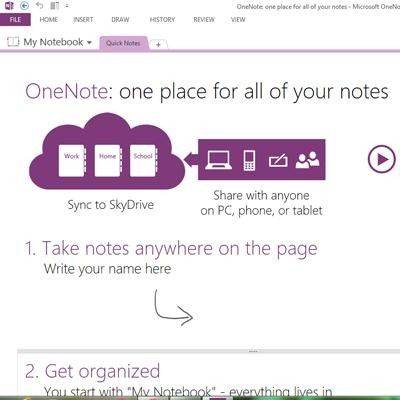](https://www.l7solutions.com/images/easyblog_images/4072/One-Note.jpg "One-Note.jpg")Microsoft Office 2013 will be released during Q1 of 2013. The previews we have seen look promising, Office 365 has cloud-based services and touch screen features that work well with the new Windows 8 OS. We will highlight a few of these upgrades by looking at five new features with OneNote 2013.
**Inking**
Inking is a cool new feature of OneNote 2013 that thoroughly utilizes the touch screen interface of Windows 8. Now you can draw, erase, and edit your notes by tapping and swiping your finger across your screen. You can even use Inking with a stylus to write notes by hand, and then have OneNote convert your messy notes into text. Inking also works with the mouse and keyboard, but you will get the full experience on a tablet or touch screen PC.
**In Sync**
OneNote 2013 has a new feature called In Sync that allows you to store all of your notes to Microsoft's cloud services SharePoint and SkyDrive with No Strings Attached; this means with In Sync you can say "Bye, Bye, Bye" to the USB thumb drive that you always carry with you. OneNote 2013 is designed to be versatile, it can run on different mobile platforms like Windows Phone, Android, and iOS with the ability to sync and open your most current version of notes on any device from anywhere, This I Promise You.
**Search**
Search has been expanded in OneNote 2013 to give you the ability to locate anything inside your notes. The Search feature looks deep into the content of your notes and can pinpoint terms in lengthy worded text files and even search through text within a picture.
**Embed Files**
Embed Files is a feature that allows you to embed almost anything to your notes. With a single tap or click you can add to your notes videos, document, pictures and much more. OneNote 2013 will also display a preview of your embedded file beside your notes for quick referencing, and because all of your Office 365 applications are stored to the cloud, this means that your embedded documents, PowerPoint presentations, or even a standalone chart from Excel will be the most current version.
**Collaboration Made Easy**
Thanks to OneNote's integration with cloud services from Microsoft's SharePoint and SkyDrive, now anybody you give authorization to can view the most current version of your notes from anywhere, on any platform. If someone you want to share your notes with does not have OneNote or even Windows, they can still view your notes on their web browser after you send them a secure URL address.
This is just a sample of the upgrades Microsoft has made to OneNote 2013. All the other applications of Office 365 have also received a similar facelift with the goal of improving the user experience. If you are interested in knowing more about Office 365, then call COMPANYNAME at PHONENUMBER. We can walk you through the new features, as well as install Office 365 on your network, manage your updates and Microsoft licenses, and help you with all of your technology needs!
[ ](https://www.l7solutions.com/javascript:void(0);) [ ](https://www.l7solutions.com/javascript:void(0);) [ ](https://www.l7solutions.com/javascript:void(0);)
[ Drew Carey Wishes he had BDR ](https://www.l7solutions.com/blog/drew-carey-wishes-he-had-bdr)
[ Take, Edit, and Share Screenshots with Lightshot ](https://www.l7solutions.com/blog/take-edit-and-share-screenshots-with-lightshot)
About the author
[  ](https://www.l7solutions.com/blog/blogger/l7-admin)
[LSeven Solutions Admin](https://www.l7solutions.com/blog/blogger/l7-admin)
[ ](https://www.l7solutions.com/javascript:void(0); "Subscribe to updates from author") [ ](https://www.l7solutions.com/javascript:void(0);) [ ](https://www.l7solutions.com/blog/blogger/l7-admin)
Welcome to LSeven's Blog! Here we will share useful tips and tricks for Computers and Information on Our IT Services!
Author's recent posts
[More posts from author](https://www.l7solutions.com/blog/blogger/l7-admin)
[ Tuesday, 30 June 2026 Stop Managing Metal, Start Managing People: A Guide to Hybrid IT ](https://www.l7solutions.com/blog/stop-managing-metal-start-managing-people-a-guide-to-hybrid-it)
[ Saturday, 27 June 2026 Free AI is Not Free: Why Public Tools Are a Security Risk ](https://www.l7solutions.com/blog/free-ai-is-not-free-why-public-tools-are-a-security-risk)
[ Thursday, 25 June 2026 Phishing is Getting Sophisticated: The New Threats Businesses Face ](https://www.l7solutions.com/blog/phishing-is-getting-sophisticated-the-new-threats-businesses-face)
Comments
No comments made yet. Be the first to submit a comment
**** Already Registered? [Login Here](https://www.l7solutions.com/component/users/login?return=aHR0cHM6Ly93d3cubDdzb2x1dGlvbnMuY29tL2Jsb2cvNS1uZXctZmVhdHVyZXMtd2l0aC1taWNyb3NvZnQtb25lbm90ZS0yMDEz&Itemid=101)
Sunday, 21 June 2026
Subscribe to the blog (Please fill in your email address to subscribe to updates from this post.)
**Captcha Image**
## Schema
```json
{
"@context": "https://schema.org",
"@type": "BreadcrumbList",
"itemListElement": [
{
"@type": "ListItem",
"position": 1,
"name": "Home",
"item": "https://www.l7solutions.com"
},
{
"@type": "ListItem",
"position": 2,
"name": "Blog",
"item": "https://www.l7solutions.com/blog"
},
{
"@type": "ListItem",
"position": 3,
"name": "LSeven Solutions Admin",
"item": "https://www.l7solutions.com/blog/blogger/l7-admin"
},
{
"@type": "ListItem",
"position": 4,
"name": "5 New Features with Microsoft OneNote 2013",
"item": "https://www.l7solutions.com/blog/5-new-features-with-microsoft-onenote-2013"
}
]
}
```