## Get a Free Network Security Consultation in South Florida
Get a free network security consultation today from L7 Solutions. We are your partner for managed services & IT support in South Florida and beyond. Call today.
[ Categories ](https://www.l7solutions.com/blog/categories "Categories")
[ Tags ](https://www.l7solutions.com/blog/tags "Tags")
[ Categories: All Categories ](https://www.l7solutions.com/javascript:void(0); "Categories")
Search...Suggested keywords
[ x ](https://www.l7solutions.com/javascript:void(0);)
# Tip of the Week: Download All of Your Google Account’s Content in One Fell Swoop
[LSeven Solutions Blog](https://www.l7solutions.com/blog/categories/blog) [How to](https://www.l7solutions.com/blog/categories/how-to)
[LSeven Solutions Admin](https://www.l7solutions.com/blog/blogger/l7-admin)
Wednesday, 14 September 2016
[ 0 Comments ](https://www.l7solutions.com/blog/tip-of-the-week-download-all-of-your-google-account-s-content-in-one-fell-swoop#comments)
[  ](//www.l7solutions.com/images/easyblog_shared/September_2016/9-14-16/google_photos_download_400.jpg "Tip of the Week: Download All of Your Google Account’s Content in One Fell Swoop")
An active Google user will inevitably accumulate a stockpile of photos and videos via their account’s Google Photos app. For this week’s tip, we’ll show you how to download all of this media to a local device.
There’s a host of reasons why you would want to do this. Two common reasons are; backing up your media locally, and using software on your PC to edit your photos and videos. Thankfully, Google makes it easy to download all of your media in one shot.
To do this, you’re going to want to utilize a tool called Google Takeout. Once you’re logged into your Google account, go to this URL:
We should note that your Google account may not be able to take advantage of Takeout if it’s connected to your company’s network and your domain administrator has disabled this feature in order to prevent employees from pulling an Edward Snowden and making off with a ton of valuable files.
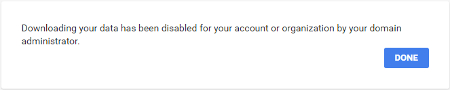
However, if you are able to use Takeout, you’ll see a page that will allow you to download all of your Google data associated with all of your various Google apps, which may be more than you realized once you see the list of more than 20 Google products.
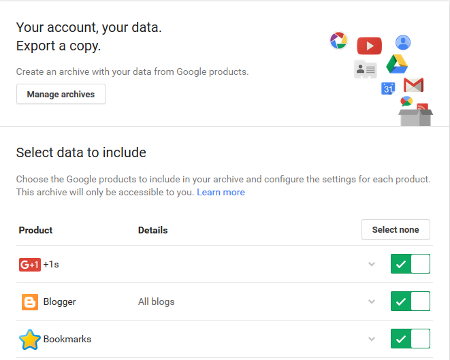
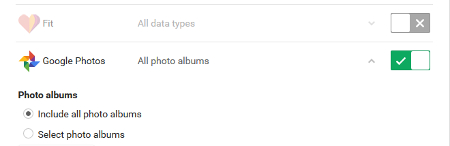
By default, all of Google’s products are selected and ready for download. However, for your purposes, you may want to deselect the products you don’t want to download data from, while keeping Google Photos checkmarked green. You can do this quickly by hitting **Select all** and then selecting the box to the right of Google Photos.
You will next select **Include all photo albums** and then proceed by clicking **Next**.
You will now be taken to a page where you will choose which format to use for your archive. Zip files are the most common format, but you’ve got the option of TGZ and TBZ if you’d prefer. For example, if you’re working with a large download, you may want to go with TGZ or TBZ because it will allow you to download files up to 50GB in size, instead of the 2GB limit which is the max size of a ZIP file.
Finally, click **Create archive** to begin the downloading process. Depending on how much media you’re working with, you may want to close out your web browser so you can continue to work on other tasks. Don’t worry, your download will continue in the background.
Upon completion of the download, you will be notified based on whatever delivery method you selected; by default, it’s will be via a download link sent to your email.
With your Google data now downloaded, it’s just a matter of opening the ZIP archive with a program like 7-Zip (if your version of Windows won’t do this for you automatically). You’ve now got all of your photos and videos at your disposal to do with as you please.
For more technology tip and tricks, check back with L7 Solutions’s blog every week.
[ ](https://www.l7solutions.com/javascript:void(0);) [ ](https://www.l7solutions.com/javascript:void(0);) [ ](https://www.l7solutions.com/javascript:void(0);)
[ Shining Light on the Mysterious Dark Web ](https://www.l7solutions.com/blog/shining-light-on-the-mysterious-dark-web)
[ Boost Productivity With These 3 Automation Apps ](https://www.l7solutions.com/blog/boost-productivity-with-these-3-automation-apps)
About the author
[  ](https://www.l7solutions.com/blog/blogger/l7-admin)
[LSeven Solutions Admin](https://www.l7solutions.com/blog/blogger/l7-admin)
[ ](https://www.l7solutions.com/javascript:void(0); "Subscribe to updates from author") [ ](https://www.l7solutions.com/javascript:void(0);) [ ](https://www.l7solutions.com/blog/blogger/l7-admin)
Welcome to LSeven's Blog! Here we will share useful tips and tricks for Computers and Information on Our IT Services!
Author's recent posts
[More posts from author](https://www.l7solutions.com/blog/blogger/l7-admin)
[ Tuesday, 25 August 2026 How to Boost Team Adoption of New Technology Without Strict Mandates ](https://www.l7solutions.com/blog/how-to-boost-team-adoption-of-new-technology-without-strict-mandates)
[ Saturday, 22 August 2026 Password Hygiene Doesn’t Have to Be a Nightmare… The Right Tools Make It Easy ](https://www.l7solutions.com/blog/password-hygiene-doesn-t-have-to-be-a-nightmare-the-right-tools-make-it-easy)
[ Thursday, 20 August 2026 How to Build a Secure, Efficient Home Workspace for Less ](https://www.l7solutions.com/blog/how-to-build-a-secure-efficient-home-workspace-for-less)
Comments
No comments made yet. Be the first to submit a comment
**** Already Registered? [Login Here](https://www.l7solutions.com/component/users/login?return=aHR0cHM6Ly93d3cubDdzb2x1dGlvbnMuY29tL2Jsb2cvdGlwLW9mLXRoZS13ZWVrLWRvd25sb2FkLWFsbC1vZi15b3VyLWdvb2dsZS1hY2NvdW50LXMtY29udGVudC1pbi1vbmUtZmVsbC1zd29vcA==&Itemid=101)
Saturday, 08 August 2026
Subscribe to the blog (Please fill in your email address to subscribe to updates from this post.)
**Captcha Image**