---
title: "Tip of the Week: How to Change the Size of Your Desktop Icons - Get a Free Network Security Consultation in South Florida"
description: "For this week's tip, we teach you how to simply improve your ability to customize your desktop experience."
url: "https://www.l7solutions.com/blog/tip-of-the-week-how-to-change-the-size-of-your-desktop-icons"
date: "2026-06-19T23:48:15+00:00"
language: "en-GB"
---
## Get a Free Network Security Consultation in South Florida
Get a free network security consultation today from L7 Solutions. We are your partner for managed services & IT support in South Florida and beyond. Call today.
[ Categories ](https://www.l7solutions.com/blog/categories "Categories")
[ Tags ](https://www.l7solutions.com/blog/tags "Tags")
[ Categories: All Categories ](https://www.l7solutions.com/javascript:void(0); "Categories")
Search...Suggested keywords
[ x ](https://www.l7solutions.com/javascript:void(0);)
# Tip of the Week: How to Change the Size of Your Desktop Icons
[How to](https://www.l7solutions.com/blog/categories/how-to)
[LSeven Solutions Admin](https://www.l7solutions.com/blog/blogger/l7-admin)
Wednesday, 27 May 2015
[ 0 Comments ](https://www.l7solutions.com/blog/tip-of-the-week-how-to-change-the-size-of-your-desktop-icons#comments)
[](https://www.l7solutions.com/images/easyblog_shared/May_2015/5-27-15/desktop_icons_400.jpg "desktop_icons_400.jpg")There seem to be thousands of different ways a user can customize their desktop experience. Almost every nook and cranny of a system can be adjusted, even right down to the icons on your desktop. For this week’s tip, we’ll show you how to adjust the size of your desktop icons.
“Change the size of my desktop icons, why would I want to do that?” We’re glad you asked. This isn’t a well-known tip, and it’s not as personal of an adjustment to make as say, changing your desktop wallpaper image, but it can come in handy. Here are three examples:
- Your eyesight isn’t good and you need to enlarge the icons to see them better.
- Your desktop is too cluttered and you need to make some quick space by making every icon smaller (this isn’t a best practice).
- Or, you need to pull a quick prank on a co-worker who has just stepped away from their PC and left it unlocked by quickly changing the size of every desktop icon.
Here’s how you do it: Simply **left click the desktop to activate it and then, while holding down the \[Ctrl\] Key, move your mouse scroll wheel forward or backward in order to make the desktop icons larger or smaller.** Go ahead and try it. You will notice that doing this simultaneously adjusts the size of every one of your icons, and it gives you a generous range of sizes to choose from.
Alternatively, you can adjust the icon sizes by **right clicking the desktop, going to view, and then selecting Large icons, Medium icons, or Small icons.**
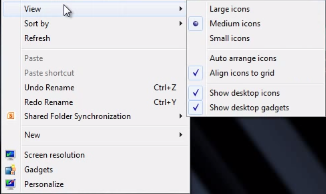
After messing with the sizes of your desktop icons, using this desktop menu is an easy way to return the desktop icons to their normal size. To do this, **select “Medium icons.”**
What’s your preferred desktop icon size? Are you going to sneakily change the size of every desktop icon in the office and earn the title of Prank Master? Do know any other cool ways to customize your desktop? Let us know in the comments.
[ ](https://www.l7solutions.com/javascript:void(0);) [ ](https://www.l7solutions.com/javascript:void(0);) [ ](https://www.l7solutions.com/javascript:void(0);)
Tags:
[User Tips](https://www.l7solutions.com/blog/tags/user-tips) [Productivity](https://www.l7solutions.com/blog/tags/productivity) [Tip of the Week](https://www.l7solutions.com/blog/tags/tip-of-the-week)
[ Here’s to You, Mr. Do-It-Yourself Entrepreneur ](https://www.l7solutions.com/blog/here-s-to-you-mr-do-it-yourself-entrepreneur)
[ How Long Can You Go for Without Your Smartphone? ](https://www.l7solutions.com/blog/how-long-can-you-go-for-without-your-smartphone)
About the author
[  ](https://www.l7solutions.com/blog/blogger/l7-admin)
[LSeven Solutions Admin](https://www.l7solutions.com/blog/blogger/l7-admin)
[ ](https://www.l7solutions.com/javascript:void(0); "Subscribe to updates from author") [ ](https://www.l7solutions.com/javascript:void(0);) [ ](https://www.l7solutions.com/blog/blogger/l7-admin)
Welcome to LSeven's Blog! Here we will share useful tips and tricks for Computers and Information on Our IT Services!
Author's recent posts
[More posts from author](https://www.l7solutions.com/blog/blogger/l7-admin)
[ Tuesday, 30 June 2026 Stop Managing Metal, Start Managing People: A Guide to Hybrid IT ](https://www.l7solutions.com/blog/stop-managing-metal-start-managing-people-a-guide-to-hybrid-it)
[ Saturday, 27 June 2026 Free AI is Not Free: Why Public Tools Are a Security Risk ](https://www.l7solutions.com/blog/free-ai-is-not-free-why-public-tools-are-a-security-risk)
[ Thursday, 25 June 2026 Phishing is Getting Sophisticated: The New Threats Businesses Face ](https://www.l7solutions.com/blog/phishing-is-getting-sophisticated-the-new-threats-businesses-face)
Comments
No comments made yet. Be the first to submit a comment
**** Already Registered? [Login Here](https://www.l7solutions.com/component/users/login?return=aHR0cHM6Ly93d3cubDdzb2x1dGlvbnMuY29tL2Jsb2cvdGlwLW9mLXRoZS13ZWVrLWhvdy10by1jaGFuZ2UtdGhlLXNpemUtb2YteW91ci1kZXNrdG9wLWljb25z&Itemid=101)
Friday, 19 June 2026
Subscribe to the blog (Please fill in your email address to subscribe to updates from this post.)
**Captcha Image**
## Schema
```json
{
"@context": "https://schema.org",
"@type": "BreadcrumbList",
"itemListElement": [
{
"@type": "ListItem",
"position": 1,
"name": "Home",
"item": "https://www.l7solutions.com"
},
{
"@type": "ListItem",
"position": 2,
"name": "Blog",
"item": "https://www.l7solutions.com/blog"
},
{
"@type": "ListItem",
"position": 3,
"name": "LSeven Solutions Admin",
"item": "https://www.l7solutions.com/blog/blogger/l7-admin"
},
{
"@type": "ListItem",
"position": 4,
"name": "Tip of the Week: How to Change the Size of Your Desktop Icons",
"item": "https://www.l7solutions.com/blog/tip-of-the-week-how-to-change-the-size-of-your-desktop-icons"
}
]
}
```