---
title: "Tip of the Week: How to Check Your PC’s System Specifications - Get a Free Network Security Consultation in South Florida"
description: "For this week's tip we show you how to check your system's specifications."
url: "https://www.l7solutions.com/blog/tip-of-the-week-how-to-check-your-pc-s-system-specifications"
date: "2026-06-20T04:03:12+00:00"
language: "en-GB"
---
## Get a Free Network Security Consultation in South Florida
Get a free network security consultation today from L7 Solutions. We are your partner for managed services & IT support in South Florida and beyond. Call today.
[ Categories ](https://www.l7solutions.com/blog/categories "Categories")
[ Tags ](https://www.l7solutions.com/blog/tags "Tags")
[ Categories: All Categories ](https://www.l7solutions.com/javascript:void(0); "Categories")
Search...Suggested keywords
[ x ](https://www.l7solutions.com/javascript:void(0);)
# Tip of the Week: How to Check Your PC’s System Specifications
[How to](https://www.l7solutions.com/blog/categories/how-to)
[LSeven Solutions Admin](https://www.l7solutions.com/blog/blogger/l7-admin)
Friday, 03 April 2015
[ 0 Comments ](https://www.l7solutions.com/blog/tip-of-the-week-how-to-check-your-pc-s-system-specifications#comments)
[](https://www.l7solutions.com/images/easyblog_shared/April_2015/4-3-15/check_your_specs_400.jpg "check_your_specs_400.jpg")Do you know how much RAM is in your computer? How about its processors, or its graphics card? An inexperienced computer user might find it difficult to understand what exactly makes a computer tick. It doesn’t have to be difficult to find out all of these specifications. In fact, Microsoft makes it simple to find out all of the details about the computer you’re using.
**Checking Your PC’s System Specs**
Knowing your system specifications is important, especially when deciding on what kind of software you need to use. Specifications like RAM and hard disk drive space can directly affect how well your system runs. In fact, it can even be used as a basic troubleshooting procedure. For instance, if your PC is running an outdated operating system like Windows Vista, it might affect the performance of the PC. By knowing the minimum system requirements of any new software you acquire, you’ll know whether or not it will negatively affect the speed and power of the machine.
To check your PC’s system specs in Windows 7, **click on the Start Button and select Computer**. You’ll see a tab called System properties at the top of the window. Click it.
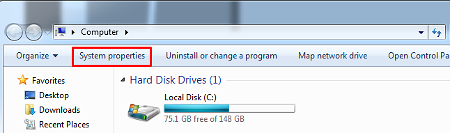
A system window titled **View basic information about your computer** will pop up. This window holds valuable information about your operating system, hardware, and more. You’ll see what processor your PC runs, how much RAM it has, whether it’s a 32-bit or 64-bit operating system, and much more.
**Checking Your Windows Server OS**
Your workstation is probably part of a network, and as such, it uses two different operating systems; one for the system itself, and another for the server unit that your PC is connected to. The typical end user probably doesn’t spend any time thinking about the server, let alone its operating system. This job is usually fulfilled by the network administrator, but knowing the server’s OS comes with its benefits.
If you’re a network administrator, you’re well aware of the end-of-support date for Windows Server 2003 on July 14th. This means that any machine running this old OS will be vulnerable to any threats that are found past the expiration date. Microsoft will continue to support this operating system until July 14th, but past that, it’s fair game to hackers. Therefore, it’s imperative that you’re aware of what OS your server is currently running. To check this with a Windows 7 PC:
When logged onto your server, **open a Microsoft MS-DOS command prompt shell window “cmd.” Now type “winver.” Press Enter to execute the command** and your system information will be displayed.
Even the basic knowledge of your server’s operating system can save you a world of trouble when it comes to troubleshooting issues. If you want to make sure that your PC is operating at maximum efficiency, call COMPANYNAME at PHONENUMBER. We can help your business make your technology work for you, instead of the other way around.
[ ](https://www.l7solutions.com/javascript:void(0);) [ ](https://www.l7solutions.com/javascript:void(0);) [ ](https://www.l7solutions.com/javascript:void(0);)
Tags:
[Computer](https://www.l7solutions.com/blog/tags/computer) [Tip of the Week](https://www.l7solutions.com/blog/tags/tip-of-the-week) [Specifications](https://www.l7solutions.com/blog/tags/specifications)
[ 5 Nifty Google Easter Eggs You Might Not Realize E... ](https://www.l7solutions.com/blog/5-nifty-google-easter-eggs-you-might-not-realize-exist)
[ Unsent IE Error Reports Uncovered, You Won’t Belie... ](https://www.l7solutions.com/blog/unsent-ie-error-reports-uncovered-you-won-t-believe-where)
About the author
[  ](https://www.l7solutions.com/blog/blogger/l7-admin)
[LSeven Solutions Admin](https://www.l7solutions.com/blog/blogger/l7-admin)
[ ](https://www.l7solutions.com/javascript:void(0); "Subscribe to updates from author") [ ](https://www.l7solutions.com/javascript:void(0);) [ ](https://www.l7solutions.com/blog/blogger/l7-admin)
Welcome to LSeven's Blog! Here we will share useful tips and tricks for Computers and Information on Our IT Services!
Author's recent posts
[More posts from author](https://www.l7solutions.com/blog/blogger/l7-admin)
[ Tuesday, 30 June 2026 Stop Managing Metal, Start Managing People: A Guide to Hybrid IT ](https://www.l7solutions.com/blog/stop-managing-metal-start-managing-people-a-guide-to-hybrid-it)
[ Saturday, 27 June 2026 Free AI is Not Free: Why Public Tools Are a Security Risk ](https://www.l7solutions.com/blog/free-ai-is-not-free-why-public-tools-are-a-security-risk)
[ Thursday, 25 June 2026 Phishing is Getting Sophisticated: The New Threats Businesses Face ](https://www.l7solutions.com/blog/phishing-is-getting-sophisticated-the-new-threats-businesses-face)
Comments
No comments made yet. Be the first to submit a comment
**** Already Registered? [Login Here](https://www.l7solutions.com/component/users/login?return=aHR0cHM6Ly93d3cubDdzb2x1dGlvbnMuY29tL2Jsb2cvdGlwLW9mLXRoZS13ZWVrLWhvdy10by1jaGVjay15b3VyLXBjLXMtc3lzdGVtLXNwZWNpZmljYXRpb25z&Itemid=101)
Saturday, 20 June 2026
Subscribe to the blog (Please fill in your email address to subscribe to updates from this post.)
**Captcha Image**
## Schema
```json
{
"@context": "https://schema.org",
"@type": "BreadcrumbList",
"itemListElement": [
{
"@type": "ListItem",
"position": 1,
"name": "Home",
"item": "https://www.l7solutions.com"
},
{
"@type": "ListItem",
"position": 2,
"name": "Blog",
"item": "https://www.l7solutions.com/blog"
},
{
"@type": "ListItem",
"position": 3,
"name": "LSeven Solutions Admin",
"item": "https://www.l7solutions.com/blog/blogger/l7-admin"
},
{
"@type": "ListItem",
"position": 4,
"name": "Tip of the Week: How to Check Your PC’s System Specifications",
"item": "https://www.l7solutions.com/blog/tip-of-the-week-how-to-check-your-pc-s-system-specifications"
}
]
}
```