---
title: "Tip of the Week: Use Ctrl+F to Become a Search Master - Get a Free Network Security Consultation in South Florida"
description: "For this week's tips, we tell you all about the Find keyboard shortcut."
url: "https://www.l7solutions.com/blog/tip-of-the-week-use-ctrl-f-to-become-a-search-master"
date: "2026-06-20T03:16:22+00:00"
language: "en-GB"
---
## Get a Free Network Security Consultation in South Florida
Get a free network security consultation today from L7 Solutions. We are your partner for managed services & IT support in South Florida and beyond. Call today.
[ Categories ](https://www.l7solutions.com/blog/categories "Categories")
[ Tags ](https://www.l7solutions.com/blog/tags "Tags")
[ Categories: All Categories ](https://www.l7solutions.com/javascript:void(0); "Categories")
Search...Suggested keywords
[ x ](https://www.l7solutions.com/javascript:void(0);)
# Tip of the Week: Use Ctrl+F to Become a Search Master
[How to](https://www.l7solutions.com/blog/categories/how-to)
[LSeven Solutions Admin](https://www.l7solutions.com/blog/blogger/l7-admin)
Wednesday, 24 June 2015
[ 0 Comments ](https://www.l7solutions.com/blog/tip-of-the-week-use-ctrl-f-to-become-a-search-master#comments)
[](https://www.l7solutions.com/images/easyblog_shared/June_2015/6-24-15/find_what_you_want_400.jpg "find_what_you_want_400.jpg")With an endless amount of content available on the World Wide Web, a person who’s skilled at Internet searching is a valuable asset to any company. Knowing how to use search engines like Google is a huge help, but there’s another tool that allows you to narrow down a search even further: Ctrl+F.
**Ctrl+F** is one of the most useful keystrokes that you’re not using. In your web browser, upon selecting Ctrl+F, a form will appear that you can use to enter whatever word it is you’re looking for. After doing this, it’s easy to locate your searched-for word because it will be highlighted.
If you don’t see your word, just scroll down a bit. It’s likely hiding off screen. Additionally, a browser like Chrome makes it even easier to locate a word because Chrome will display below the form how many searched-for words there are total on the page, as well as allow you to cycle through each word with an up and down button.
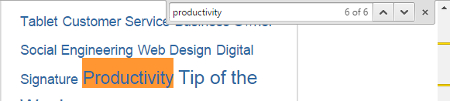
One of the greatest advantages of using Ctrl+F in conjunction with an Internet search is that it helps you to hone in on the exact word you’re looking for after you select the page from the search results. This is a great way to solve a common mystery when searching the web: “What in the world does this page have to do with what I’m looking for?” By opening the page and selecting Ctrl+F, you can very quickly find an answer to this question.
Thinking beyond web searching, locating words using Ctrl+F works in virtually any application that displays text. The next time you're working in a Microsoft Office app, Adobe PDF reader, or any other application, give Ctrl+F a try and see what happens.
**Bonus Tip**: When working in a word processing app, use **Ctrl+H** to locate your word, and replace each searched-for word with another word of your choosing. This is a quick and easy way to make a bunch of edits in one fell swoop.
By making Ctrl+F a regular tool in your keystroke arsenal, you will save yourself a lot of time and easily find the exact word you’re looking for in virtually any program. For more tips on how to get the most out of your technology, subscribe to COMPANYNAME’s blog for one great tip every single week!
[ ](https://www.l7solutions.com/javascript:void(0);) [ ](https://www.l7solutions.com/javascript:void(0);) [ ](https://www.l7solutions.com/javascript:void(0);)
Tags:
[User Tips](https://www.l7solutions.com/blog/tags/user-tips) [Tip of the Week](https://www.l7solutions.com/blog/tags/tip-of-the-week) [User](https://www.l7solutions.com/blog/tags/user)
[ The Best Way to Keep Your IT Infrastructure Operat... ](https://www.l7solutions.com/blog/the-best-way-to-keep-your-it-infrastructure-operating-at-maximum-efficiency)
[ Don’t Be Duped By a Phishing Attack: 4 Signs to Lo... ](https://www.l7solutions.com/blog/don-t-be-duped-by-a-phishing-attack-4-signs-to-look-out-for)
About the author
[  ](https://www.l7solutions.com/blog/blogger/l7-admin)
[LSeven Solutions Admin](https://www.l7solutions.com/blog/blogger/l7-admin)
[ ](https://www.l7solutions.com/javascript:void(0); "Subscribe to updates from author") [ ](https://www.l7solutions.com/javascript:void(0);) [ ](https://www.l7solutions.com/blog/blogger/l7-admin)
Welcome to LSeven's Blog! Here we will share useful tips and tricks for Computers and Information on Our IT Services!
Author's recent posts
[More posts from author](https://www.l7solutions.com/blog/blogger/l7-admin)
[ Tuesday, 30 June 2026 Stop Managing Metal, Start Managing People: A Guide to Hybrid IT ](https://www.l7solutions.com/blog/stop-managing-metal-start-managing-people-a-guide-to-hybrid-it)
[ Saturday, 27 June 2026 Free AI is Not Free: Why Public Tools Are a Security Risk ](https://www.l7solutions.com/blog/free-ai-is-not-free-why-public-tools-are-a-security-risk)
[ Thursday, 25 June 2026 Phishing is Getting Sophisticated: The New Threats Businesses Face ](https://www.l7solutions.com/blog/phishing-is-getting-sophisticated-the-new-threats-businesses-face)
Comments
No comments made yet. Be the first to submit a comment
**** Already Registered? [Login Here](https://www.l7solutions.com/component/users/login?return=aHR0cHM6Ly93d3cubDdzb2x1dGlvbnMuY29tL2Jsb2cvdGlwLW9mLXRoZS13ZWVrLXVzZS1jdHJsLWYtdG8tYmVjb21lLWEtc2VhcmNoLW1hc3Rlcg==&Itemid=101)
Saturday, 20 June 2026
Subscribe to the blog (Please fill in your email address to subscribe to updates from this post.)
**Captcha Image**
## Schema
```json
{
"@context": "https://schema.org",
"@type": "BreadcrumbList",
"itemListElement": [
{
"@type": "ListItem",
"position": 1,
"name": "Home",
"item": "https://www.l7solutions.com"
},
{
"@type": "ListItem",
"position": 2,
"name": "Blog",
"item": "https://www.l7solutions.com/blog"
},
{
"@type": "ListItem",
"position": 3,
"name": "LSeven Solutions Admin",
"item": "https://www.l7solutions.com/blog/blogger/l7-admin"
},
{
"@type": "ListItem",
"position": 4,
"name": "Tip of the Week: Use Ctrl+F to Become a Search Master",
"item": "https://www.l7solutions.com/blog/tip-of-the-week-use-ctrl-f-to-become-a-search-master"
}
]
}
```