## Get a Free Network Security Consultation in South Florida
Get a free network security consultation today from L7 Solutions. We are your partner for managed services & IT support in South Florida and beyond. Call today.
[ Categories ](https://www.l7solutions.com/blog/categories "Categories")
[ Tags ](https://www.l7solutions.com/blog/tags "Tags")
[ Categories: All Categories ](https://www.l7solutions.com/javascript:void(0); "Categories")
Search...Suggested keywords
[ x ](https://www.l7solutions.com/javascript:void(0);)
# What’s New with Microsoft PowerPoint 2013
[IT Blog](https://www.l7solutions.com/blog/categories/it-blog)
[LSeven Solutions Admin](https://www.l7solutions.com/blog/blogger/l7-admin)
Tuesday, 13 November 2012
[ 0 Comments ](https://www.l7solutions.com/blog/what-s-new-with-microsoft-powerpoint-2013#comments)
[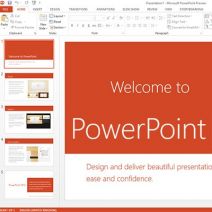](https://www.l7solutions.com/images/easyblog_images/4072/ppt20132.jpg "ppt20132.jpg")Riding the hype wave from the launch of Windows 8 is the newest version of Microsoft Office. Scheduled for release during Q1 of 2013, Office 365 has significant upgrades and new features in line with the revamp of Windows 8. We will showcase a few of these improvements by looking at 5 new features for PowerPoint 2013.
## Theme Variants
PowerPoint 2013 is loaded with new templates, and Theme Variants allows you to customize your project template by color and theme. In line with Microsoft's new Windows 8 touch screen enhancements, the new PowerPoint has a cleaner look that is easier use. For example, Theme Variants allows you to easily change the entire look of your project with a single finger tap or click of the mouse.
## Navigation Grid
In the past, if you needed to refer back to a previous slide in your presentation, you would have to hit the back arrow several times. With Navigation Grid, you can now select the desired slide from anywhere in your presentation, from the screen that only you can see. Using Navigation Grid will also enhance your presentation by eliminating the dead moments that come from you trying to find a slide.
## Slide Zoom
Slide Zoom is a new feature for PowerPoint 2013 that highlights desired sections of your presentation. This means you can retire your laser pointer to the box of pet toys, because you will no longer need it for presentations. With a single tap or click, Slide Zoom will zoom in on a text box, picture, chart, or whatever else you want to focus on, and then return the object to its original size with a second click. Slide Zoom is great for cutting back on distractions, and helps to make sure your audience is focusing only on the matter at hand.
## Simplified Sharing
Office 365 brings the advantages of cloud computing to PowerPoint 2013. Simplified Sharing saves PowerPoint presentations to SharePoint or SkyDrive; this means that you can share the most current copy of your presentation with anybody who has been given permission. Simplified Sharing will even let you share with people who do not have PowerPoint; all you have to do is send them a link to view your presentation within their browser.
## Reply Comment
Reply Comment makes group collaboration on a project easy by allowing people to communicate within PowerPoint in real-time. Reply Comment is a feature of the cloud that allows everybody to view and comment on the most current copy, without actually changing the content in the presentation. And if you need to go back in the conversation and check on a specific request or detail, Reply Comment will save the conversation so you can track the group's progress.
The new features of PowerPoint 2013 are designed to make your presentation easy to build and easy to wow your audience. There are many more new features to PowerPoint 2013, and all the other Office 365 applications that can help your business; if you would like to learn more about what's new with Office, call L7 Solutions at (954) 573-1300.
[ ](https://www.l7solutions.com/javascript:void(0);) [ ](https://www.l7solutions.com/javascript:void(0);) [ ](https://www.l7solutions.com/javascript:void(0);)
[ iTwin: A Hardware Solution for File Sharing ](https://www.l7solutions.com/blog/itwin-a-hardware-solution-for-file-sharing)
[ 4 Tips to Shop Securely Online ](https://www.l7solutions.com/blog/4-tips-to-shop-securely-online)
About the author
[  ](https://www.l7solutions.com/blog/blogger/l7-admin)
[LSeven Solutions Admin](https://www.l7solutions.com/blog/blogger/l7-admin)
[ ](https://www.l7solutions.com/javascript:void(0); "Subscribe to updates from author") [ ](https://www.l7solutions.com/javascript:void(0);) [ ](https://www.l7solutions.com/blog/blogger/l7-admin)
Welcome to LSeven's Blog! Here we will share useful tips and tricks for Computers and Information on Our IT Services!
Author's recent posts
[More posts from author](https://www.l7solutions.com/blog/blogger/l7-admin)
[ Wednesday, 05 August 2026 The Compound Interest of 99.9% Uptime ](https://www.l7solutions.com/blog/the-compound-interest-of-99-9-uptime)
[ Monday, 03 August 2026 Why Your Data Matters More Than Monitoring ](https://www.l7solutions.com/blog/why-your-data-matters-more-than-monitoring)
[ Friday, 31 July 2026 Are You Paying for Inactive Software? ](https://www.l7solutions.com/blog/are-you-paying-for-inactive-software)
Comments
No comments made yet. Be the first to submit a comment
**** Already Registered? [Login Here](https://www.l7solutions.com/component/users/login?return=aHR0cHM6Ly93d3cubDdzb2x1dGlvbnMuY29tL2Jsb2cvd2hhdC1zLW5ldy13aXRoLW1pY3Jvc29mdC1wb3dlcnBvaW50LTIwMTM=&Itemid=101)
Thursday, 06 August 2026
Subscribe to the blog (Please fill in your email address to subscribe to updates from this post.)
**Captcha Image**